Print the case label your retailer’s warehouse can scan.
Case Label Kit: $149, one payment
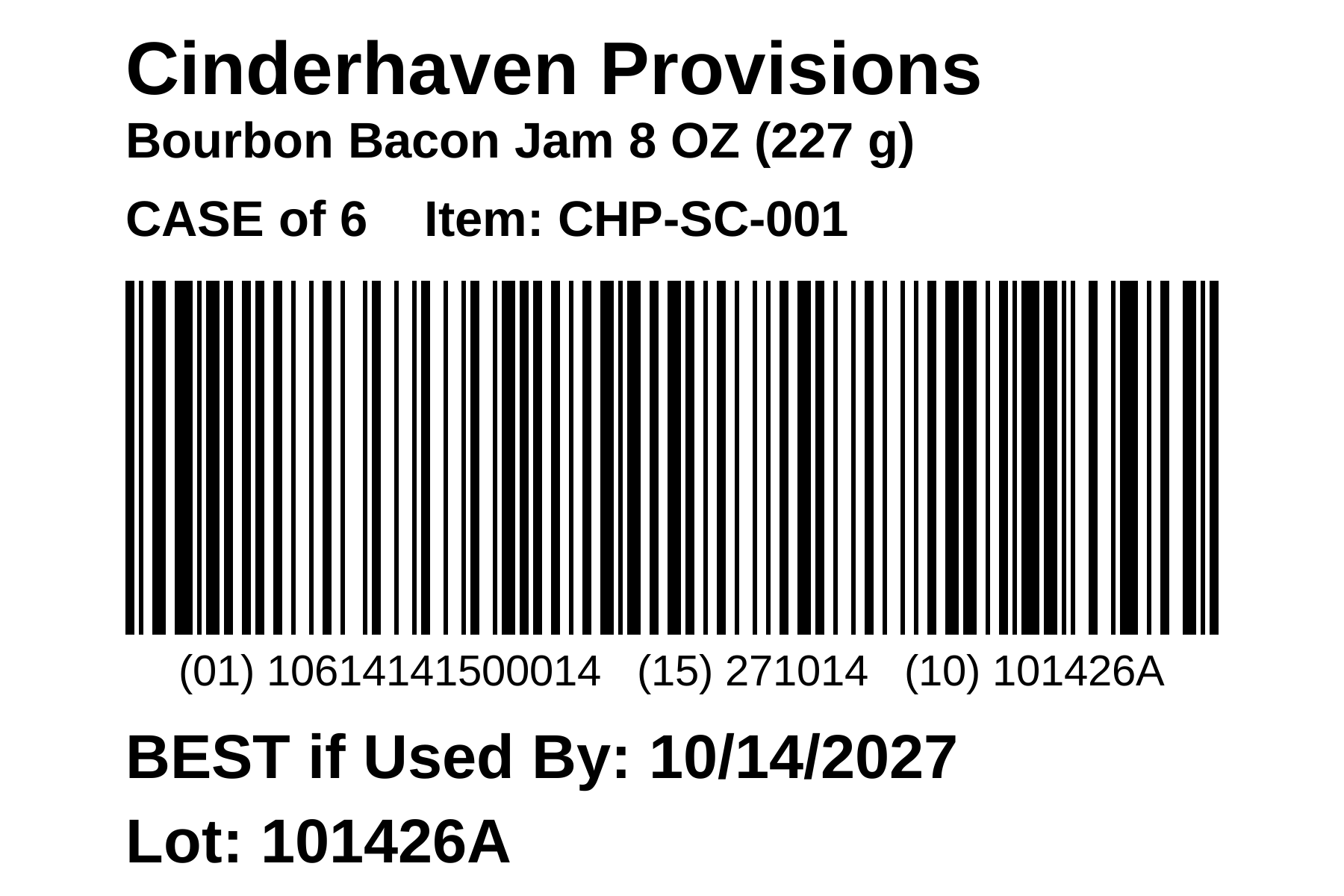
The kit prints GS1-128 case labels on 4 x 6 inch label stock. Load your product list once, pick the item and case size, type the lot code and best-by date, and print. Each label carries the case GTIN, the date and the lot in one barcode, with the human-readable line under it. It runs in your web browser on your own computer: no account, no install, and no internet connection needed.
Instant download from Payhip. Already own the kit? Get $149 off the Snapshot.
What you get
- GS1-128 case labels, 4 x 6 inches: the case GTIN (01), the best-by date (15) or use-by date (17), and the lot code (10), in one barcode.
- Bars at 0.508 mm, within GS1’s range for case labels, and never shrunk to fit. A lot code too long for one barcode gets a second barcode of its own.
- Your product list loaded from a CSV or Excel file: item number, brand, size, case size and case GTIN. A blank template is one click away.
- A live preview of every label before you print, and a PDF you can print or save.
- Checks that catch the mistakes retailers reject: a unit UPC on a case, one GTIN on two case sizes, a bad check digit, a lot code with characters GS1 doesn’t allow.
How it works
- Buy the kit. Payhip emails you a download link right away.
- Save Case-Label-Kit.html anywhere on your computer and double-click it. It opens in your web browser.
- Load your product list, or download the blank template, fill it in, and load that. The kit tells you about any row it can’t use, and why.
- Type an item number, pick the case size, type the lot code and the best-by date, and check the preview.
- Click Print, choose your label printer at 100% (Actual size), and the label prints. Or save the PDF to print later.
No account, no install, and no internet connection needed once it’s downloaded. Your product list stays on your computer.
What it does, and what it doesn’t
It prints the case label: the GS1-128 label on the shipping case that a retailer’s warehouse scans at receiving. The barcode meets GS1’s General Specifications for case labels, which is what retailer label checks test, and the kit prints the same barcode and content as a label that passed a national retailer’s check for a specialty food brand in 2026.
It doesn’t print pallet labels (SSCC), the barcode on the retail package, or retailer-specific ticket formats. It doesn’t register GTINs for you; those come from GS1 US.
See a label before you buy
Download the sample product list and the label the kit prints from it. The sample uses a made-up brand, Cinderhaven Provisions, on GS1’s demo prefix, so the GTINs aren’t anyone’s.
What you need
- A computer with a current version of Chrome or Edge. Version 1.0 is tested on Windows. It opens in Firefox too, but Firefox prints the label as a picture, so print from Chrome or Edge. It isn’t tested on a Mac or in Safari yet.
- A printer that takes 4 x 6 inch label stock: a thermal label printer such as a Zebra or Rollo, or a sheet printer with 4 x 6 labels. Labels print at 100% (Actual size), never Fit to page.
- Your product list as a CSV or Excel (.xlsx) file with these columns: Item #, Brand, Product Type, Size, Product Name, Units per Case, GTIN-14. Each case size needs its own 14-digit case GTIN.
License, in plain language
- One purchase covers one business: your own company, on as many of your company’s computers as you need, for as long as you like.
- If you print labels for client brands as a co-packer, broker or consultant, each client needs its own kit. Email me about a multi-client price.
- Please don’t resell the kit or post it for public download.
- The kit is provided as is. It prints the label you set up from the data you load. It doesn’t guarantee that a retailer will accept your cases.
Updates and support
Updates to version 1 are free. When I release one, I’ll email you, and the download link in your Payhip receipt gets you the new file.
Your version number is at the bottom of the kit’s screen.
Questions, a product list that won’t load, or a label that won’t print at actual size: email shawn@lailarallc.com. I reply within two business days.
Refunds
If the kit won’t run on your computer, can’t read your product list, or won’t print a label at actual size on your printer, email me within 14 days of purchase and I’ll refund you in full.
Already own the kit? Get $149 off the Snapshot.
The kit prints your case labels. The Data Health Snapshot checks the product data behind them: GTINs, dimensions, case packs, GDSN records and the retailer data behind chargebacks. In seven business days you get your three most expensive data problems, in dollars, with a plan to fix them.
KIT149
$801 instead of $950. Enter the code at checkout.
Not sure your GTINs are right? The GTIN Validator Kit checks every GTIN in your product list against GS1 rules and six retailer checklists: $149.